
States & Issues
Overview
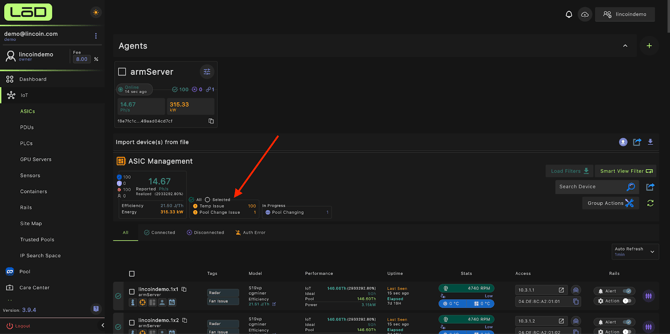
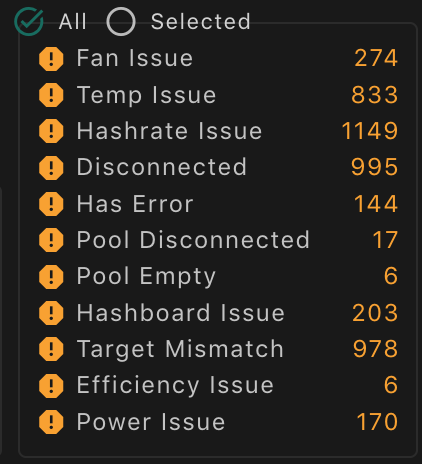
The States & Issues section displays a summary of any active problems detected with your ASICs. If there are no issues, this section will not appear under ASIC Management. When issues are present, States & Issues will be shown, listing each issue by name (for example, “Fan Issue”) along with the number of ASICs currently affected. This allows you to quickly identify and address any devices experiencing problems.
1. Fan Issue
Description
The system has detected abnormal fan behavior or irregular RPM readings. This may indicate cooling inefficiency or hardware malfunction.
What’s Happening
LōD continuously monitors fan RPM and thermal feedback to ensure proper cooling performance. A fan issue occurs when fan speed falls outside safe thresholds or fails to respond to firmware commands.
Possible Causes
- Fan speed below or above safe RPM range.
- Dust buildup or physical obstruction reduces airflow.
- Faulty fan sensor, cable, or connector.
- Firmware misreporting fan speed or curve settings.
Troubleshooting Steps
- Visually inspect fans to confirm they are spinning and free of debris.
- Check RPM readings in the miner’s interface or logs against expected ranges.
- Clean dust buildup and verify cables and connectors are securely attached.
- Review firmware configuration for proper fan curve or control mode.
- Replace the fan if speed remains erratic or below threshold after cleaning.
2. Temp Issue
Description
The device temperature has exceeded or fallen outside the configured safe operating range.
What’s Happening
The firmware monitors chip, board, and ambient sensors to maintain optimal performance. If temperatures exceed safe thresholds, mining performance may throttle or stop to prevent damage.
Possible Causes
- Inadequate cooling or restricted airflow.
- High ambient temperature in the facility.
- Dust accumulation on heatsinks or fans.
- Failed or inaccurate thermal sensor.
Troubleshooting Steps
- Verify ambient temperature is within operational limits.
- Inspect airflow — confirm vents, ducts, and fans are unobstructed.
- Clean heatsinks and fans to improve heat dissipation.
- Check thermal sensors and fan speeds in the miner’s UI or logs.
- If persistent, inspect hashboards or PSU for overheating or component failure.
3. Hashrate Issue
Description
The device’s reported hashrate is below the expected or configured performance baseline.
What’s Happening
LōD compares real-time hashrate data against the miner’s rated output. A discrepancy may indicate degraded hardware performance, instability, or misconfiguration.
Possible Causes
- One or more hashboards not detected or underperforming.
- Unstable or insufficient power supply.
- Incorrect firmware, voltage, or frequency settings.
- Excessive temperature causing throttling.
Troubleshooting Steps
- Compare actual hashrate against the model’s rated capacity.
- Check hashboard status for missing or error-marked boards.
- Verify PSU output and power connections are stable.
- Reboot device to rule out temporary network or firmware glitches.
- Escalate to hardware or firmware debugging if low performance persists.
4. Disconnected
Description
The device has lost connection to the LōD management system.
What’s Happening
The miner stopped communicating with the orchestration platform, preventing it from receiving commands or reporting telemetry.
Possible Causes
- Local network interruption (LAN, switch, or router failure).
- Device reboot or power loss.
- Firmware crash or system hang.
- Incorrect IP or firewall restrictions blocking communication.
Troubleshooting Steps
- Ping the device IP to confirm basic connectivity.
- Check switch/router logs for outages or DHCP changes.
- Verify device power and ensure the miner is physically running.
- Reboot the miner if unresponsive.
- If recurring, review firmware version, network configuration, and stability.
5. Has Error
Description
A generic error has been detected by the miner firmware, indicating an unclassified internal fault.
What’s Happening
This alert appears when the firmware encounters an issue that doesn’t match a specific error code but still interrupts normal operation.
Possible Causes
- Firmware bug or software inconsistency.
- Configuration conflict between pool, user settings, or API commands.
- Hardware malfunction or intermittent fault.
Troubleshooting Steps
- Review miner logs to identify related error messages or codes.
- Restart the device to clear temporary or software-level faults.
- Update firmware to the latest stable version.
- Check configuration settings for inconsistencies.
- Contact vendor or engineering support if the error reappears after update.
6. Pool Disconnected
Description
The miner has lost connection to its configured mining pool.
What’s Happening
When a miner cannot maintain a TCP connection to the pool’s stratum server, it will stop receiving work and report as disconnected.
Possible Causes
- Pool server downtime or maintenance.
- Incorrect pool URL, port, or credentials.
- Local network interruption or DNS failure.
- Firewall or proxy interference.
Troubleshooting Steps
- Verify pool status on the pool’s website or dashboard.
- Check pool configuration (URL, port, worker name, password).
- Ping or trace the pool domain to confirm network reachability.
- Test alternate network or DNS to isolate local issues.
- Configure a backup pool to minimize downtime.
7. Pool Empty
Description
The configured pool is not providing valid work to the miner.
What’s Happening
This indicates the miner is connected but not receiving job assignments from the pool’s stratum server.
Possible Causes
- Pool backend outage or temporary maintenance.
- Incorrect or unauthorized worker credentials.
- Pool throttling or job distribution delays.
Troubleshooting Steps
- Confirm pool functionality using another known-good device.
- Recheck worker credentials in the pool configuration.
- Restart the miner to reinitiate job requests.
- Switch to a backup pool to confirm pool-side issues.
8. Hashboard Issue
Description
One or more hashboards are failing, underperforming, or not detected by the system.
What’s Happening
Each hashboard communicates telemetry and performance data to the control board. A hashboard issue occurs when one fails to initialize, report data, or meet expected performance levels.
Possible Causes
- Loose cables or poor connector seating between control board, PSU, and hashboard.
- Overheating or electrical damage to chips or traces.
- Firmware unable to read sensors or initialize the board.
Troubleshooting Steps
- Check all cabling between PSU, control board, and hashboard.
- Inspect physical boards for burn marks, discoloration, or component damage.
- Swap the suspect board into a known-working miner to isolate fault.
- Reflash firmware or perform a system reset.
- Replace defective boards if confirmed through isolation testing.
9. Target Mismatch
Description
This alert indicates that a device’s actual state does not match its expected target state within the LōD system.
For example, if a miner is targeted to be ON but is detected as OFF (or vice versa), the system will generate a Target Mismatch error.
What’s Happening
LōD continuously verifies that each device’s operational state aligns with its control target. A mismatch means the orchestration command was sent successfully, but the physical or logical device state did not update as expected.
Possible Causes
- Authentication error — invalid credentials preventing control.
- Pool or configuration mismatch — incorrect pool, worker, or firmware settings.
- Hardware or power issue — the miner is physically powered off or unstable.
- Network latency or timeout — delayed communication during state check.
- Firmware reporting delay — the miner has not yet reported the updated state.
Troubleshooting Steps
- Confirm expected state in the LōD UI — verify the device is targeted to be ON or OFF.
- Check power and connectivity — ensure the miner is powered and reachable.
- Re-authenticate device — confirm firmware credentials match the LōD configuration.
- Restart the miner to force a state refresh.
- Review logs for related Auth or Network errors.
- Escalate to engineering if mismatch persists after resets and re-authentication.
10. Efficiency Issue
Description
The device is operating outside the expected efficiency range (J/TH).
What’s Happening
Efficiency measures the relationship between hashrate and power draw. Deviations typically indicate unstable power, overheating, or firmware misconfiguration.
Possible Causes
- Unstable or noisy power supply.
- Elevated temperatures reducing performance.
- Incorrect voltage, frequency, or power limit settings.
- Aging hardware or degraded ASIC chips.
Troubleshooting Steps
- Compare reported efficiency against model specifications.
- Monitor power input and confirm voltage stability from the PDU/grid.
- Check thermal conditions and fan operation.
- Review firmware efficiency or tuning profiles.
- Escalate for tuning or board replacement if performance remains inconsistent.
11. Power Issue
Description
The device is experiencing power-related instability or delivery problems.
What’s Happening
Fluctuating or insufficient power can cause performance drops, restarts, or communication loss. The system detects these irregularities via voltage and current monitoring.
Possible Causes
- PSU instability, overload, or failure.
- Inconsistent power supply from grid or PDU.
- Loose power connectors or damaged cables.
Troubleshooting Steps
- Inspect PSU connections and cabling for looseness or damage.
- Verify input voltage from the PDU or grid is stable and within range.
- Swap PSU with a known working unit to isolate fault.
- Monitor power draw against facility capacity and circuit limits.
12. Auth Error
Description
The miner failed authentication because the username or password configured in the firmware is incorrect.
What’s Happening
The LōD system could not authenticate to the device due to mismatched or invalid credentials, preventing management or control operations.
Possible Causes
- Incorrect username or password entered in device configuration.
- Credentials changed on the firmware but not updated in the LōD system.
- Typo, formatting error, or unsupported special characters.
Troubleshooting Steps
- Verify credentials used for the miner’s firmware login.
- Update the device configuration in LōD to match firmware credentials.
- Re-enter credentials carefully to avoid typos or spacing issues.
- If credentials were reset, update them in both the firmware UI and LōD.
- Confirm no special characters are causing formatting or parsing errors.