
How to access it
- Go to Pool in the left sidebar
- Click Revenues
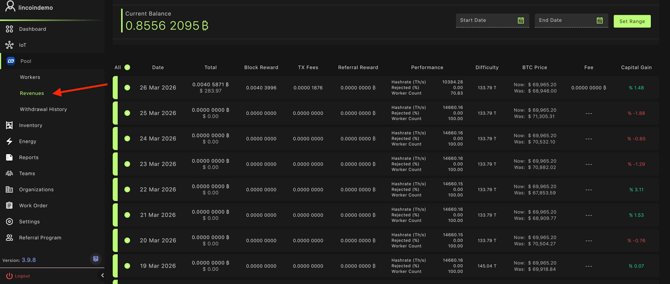
What you’re looking at
Each row represents a day and includes:
- Total earnings (BTC + USD)
- Block rewards, TX fees, referral rewards
- Performance stats (hashrate, rejected %, worker count)
- Network difficulty
- BTC price (current vs. prior reference)
- Capital gain %
This is all pulled from pool-side data tied to your workers on Lincoin pool.
Setting your date range
- Use the Start Date and End Date fields at the top right
- Click Set Range
- The table will refresh based on your selected range
- Then adjust the page size at the bottom to ensure all data point on displayed
- Check the "All" column
Exporting the report
- Click the Export button (top right)
- Choose:
- Excel (.xlsx)
- CSV
That export will reflect whatever date range you currently have set.